**Tags:** "Hello World" Examples · Frameworks Examples · React
# Wasp Hello World
A full-stack [Wasp](https://wasp.sh/) application — React client, Node.js API, and [PostgreSQL](https://www.postgresql.org) — deployed on [Zerops](https://zerops.io). The client ships as static Nginx assets; the API runs on Node.js 24 with Prisma migrations.
### Available Environments
- [AI Agent](https://app.zerops.io/recipes/wasp-hello-world.md?environment=ai-agent)
- **Remote (CDE)** ← current
- [Local](https://app.zerops.io/recipes/wasp-hello-world.md?environment=local)
- [Stage](https://app.zerops.io/recipes/wasp-hello-world.md?environment=stage)
- [Small Production](https://app.zerops.io/recipes/wasp-hello-world.md?environment=small-production)
- [Highly-available Production](https://app.zerops.io/recipes/wasp-hello-world.md?environment=highly-available-production)
### Services in this Environment
**Services:**
- **core** (core:single@2)
- Containers: 1 × Shared Core, 0.00 GB RAM, 0 GB Disk
- **apidev** (ubuntu/nodejs@24) :3000, :3001
- Containers: 1 × Shared Core, 1.06 GB RAM, 1 GB Disk
- Repository: [zerops-recipe-apps/wasp-hello-world-app](https://github.com/zerops-recipe-apps/wasp-hello-world-app)
- **apistage** (ubuntu/nodejs@24) :3001
- Containers: 1 × Shared Core, 0.75 GB RAM, 1 GB Disk
- Repository: [zerops-recipe-apps/wasp-hello-world-app](https://github.com/zerops-recipe-apps/wasp-hello-world-app)
- **appdev** (ubuntu/nodejs@24) :3000, :3001
- Containers: 1 × Shared Core, 1.06 GB RAM, 1 GB Disk
- Repository: [zerops-recipe-apps/wasp-hello-world-app](https://github.com/zerops-recipe-apps/wasp-hello-world-app)
- **appstage** (alpine/static@1.0)
- Containers: 1 × Shared Core, 0.38 GB RAM, 1 GB Disk
- Repository: [zerops-recipe-apps/wasp-hello-world-app](https://github.com/zerops-recipe-apps/wasp-hello-world-app)
- **db** (postgresql:single@16) :5432, :6432
- Containers: 1 × Shared Core, 0.38 GB RAM, 1 GB Disk
**Total Resources:** 6 containers, 3.62 GB RAM, 5 GB Disk
### One-Click Deploy (Import YAML)
Use this YAML with `zcli project import` to deploy this environment:
```yaml
#zeropsPreprocessor=on
# Remote (CDE) environment — same dev + stage client/API pairs as
# the AI agent layout for a human porter coding over SSH or a
# mounted remote filesystem. Project vault are a value store:
# APP_URL / API_URL → staged subdomains; DEV_* → appdev / apidev.
# zerops.yaml maps APP_URL → WASP_WEB_CLIENT_URL and API_URL →
# WASP_SERVER_URL / REACT_APP_API_URL for prod-api / prod-client.
project:
name: wasp-hello-world-remote
vault:
APP_URL: https://appstage-${zeropsSubdomainHost}.prg1.zerops.app
API_URL: https://apistage-${zeropsSubdomainHost}-3001.prg1.zerops.app
DEV_APP_URL: https://appdev-${zeropsSubdomainHost}-3000.prg1.zerops.app
DEV_API_URL: https://apidev-${zeropsSubdomainHost}-3001.prg1.zerops.app
services:
# Wasp API dev + stage pair — the porter codes inside `apidev`
# over SSH; `apistage` runs the production build that backs
# API_URL for end-to-end checks against the staged SPA.
- hostname: apidev
type: nodejs@24
priority: 5
zeropsSetup: dev
buildFromGit: https://github.com/zerops-recipe-apps/wasp-hello-world-app
enableSubdomainAccess: true
verticalAutoscaling:
minRam: 1
- hostname: apistage
type: nodejs@24
priority: 5
zeropsSetup: prod-api
buildFromGit: https://github.com/zerops-recipe-apps/wasp-hello-world-app
enableSubdomainAccess: true
verticalAutoscaling:
minRam: 0.5
minFreeRamGB: 0.25
# Wasp client dev + stage pair — `appdev` runs `wasp start` on
# :3000/:3001 for HMR iteration; `appstage` ships the built bundle
# on `base: static`. API_URL bakes apistage into the stage bundle.
- hostname: appdev
type: nodejs@24
zeropsSetup: dev
buildFromGit: https://github.com/zerops-recipe-apps/wasp-hello-world-app
enableSubdomainAccess: true
verticalAutoscaling:
minRam: 1
- hostname: appstage
type: static
zeropsSetup: prod-client
buildFromGit: https://github.com/zerops-recipe-apps/wasp-hello-world-app
enableSubdomainAccess: true
verticalAutoscaling:
minRam: 0.25
minFreeRamGB: 0.125
- hostname: db
type: postgresql:single@16
profile: oltp-hobby
priority: 10
```
---
## Next Steps
After deploying one of the environments and getting to know Zerops, you have two paths to choose from:
1. **Template Flow** — Clone our GitHub repositories and use the whole recipe as a template
2. **Integrate Flow** — If you already have an existing application on a similar stack, integrate the recipe setup with your application
Select a flow: [Template Flow](https://app.zerops.io/recipes/wasp-hello-world.md?environment=remote-cde&guideFlow=template) or [Integrate Flow](https://app.zerops.io/recipes/wasp-hello-world.md?environment=remote-cde&guideFlow=integrate)
Both flows are shown below:
## How to take over the Remote (CDE) environment
### 📦 Clone the template repositories
Fork or clone the following repositories to your local machine or GitHub account:
- [zerops-recipe-apps/wasp-hello-world-app](https://github.com/zerops-recipe-apps/wasp-hello-world-app)
- [zerops-recipe-apps/wasp-hello-world-app](https://github.com/zerops-recipe-apps/wasp-hello-world-app)
- [zerops-recipe-apps/wasp-hello-world-app](https://github.com/zerops-recipe-apps/wasp-hello-world-app)
- [zerops-recipe-apps/wasp-hello-world-app](https://github.com/zerops-recipe-apps/wasp-hello-world-app)
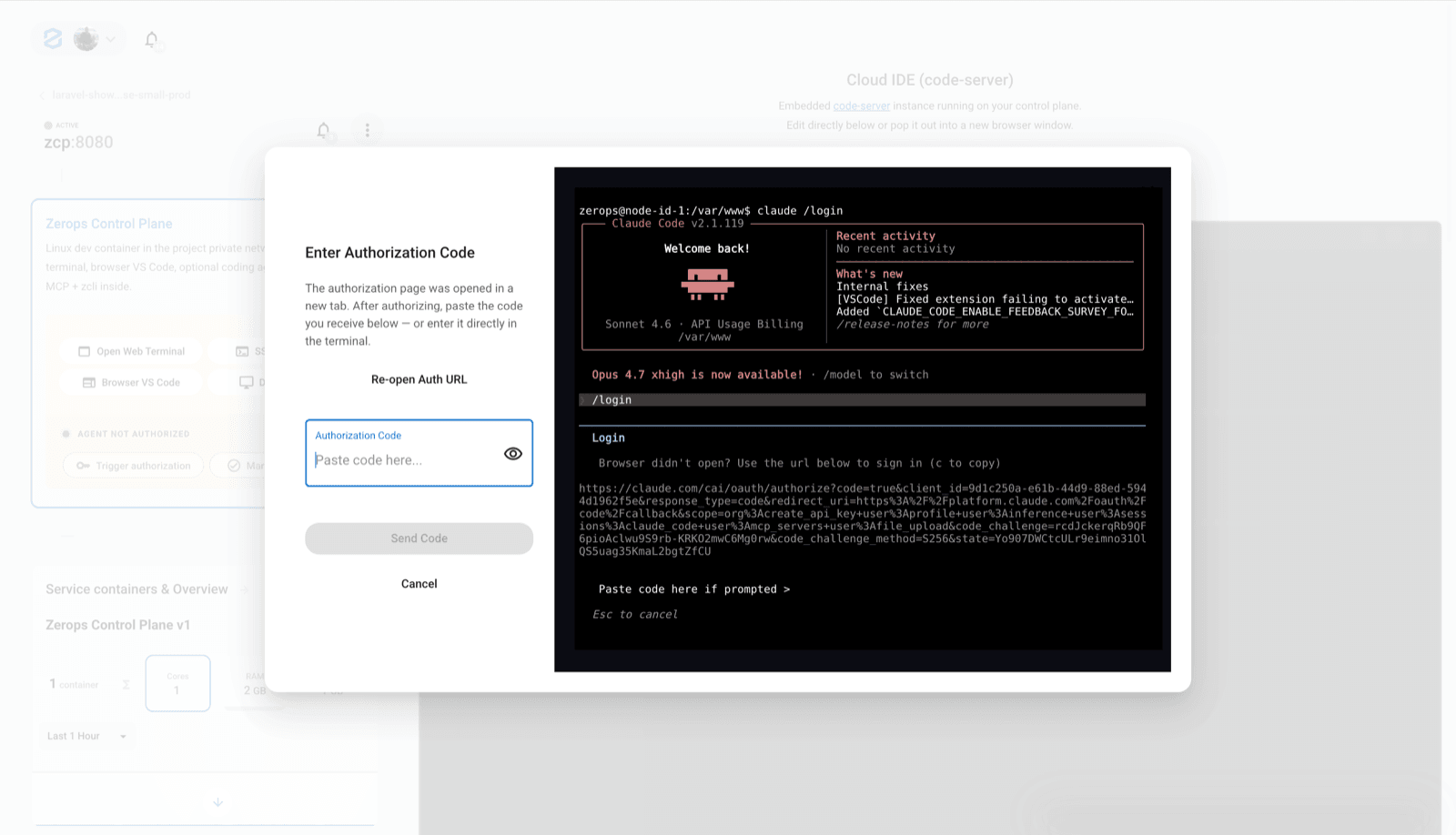
### Prerequisite: check authorization
After you deploy the remote development environment, an authorization dialog should appear.
Complete the authorization before continuing. If the dialog did not appear, open the environment guide again from the recipe detail, or use the IDE authorization flow when prompted.
 ### 1. Open your remote development environment
Your remote development environment is ready. It runs as a persistent Zerops service inside your project, close to your managed services and internal network.
Open the service in the Zerops Dashboard and check that it is running.
### 2. Choose how to connect
You can work with the remote environment from the browser or from your local tools.
#### Option 1: start in the cloud IDE
The fastest way to start coding is to open the cloud IDE from the service dashboard.
- No local setup is required.
- The workspace is already connected to your Zerops project.
- You can access internal services through Zerops networking.
- You do not need a local `.env` file in the remote workspace. Manage secrets and configuration through Zerops environment variables.
#### Option 2: connect from your local IDE or terminal
If you prefer local tooling, connect to the remote environment over SSH.
Install zCLI and log in:
```bash
npm i -g @zerops/zcli
zcli login
```
Start the VPN:
```bash
zcli vpn up
```
Connect to the remote environment:
```bash
ssh -A .zerops
```
Use this SSH connection from compatible local tools and IDEs.
### 3. Understand local vs remote development
Use the remote development environment when you want your workspace to run inside Zerops, close to your services and project network.
Use local development when you want to run the application on your own machine while connecting to Zerops services through VPN.
For local development, you can export environment variables with zCLI:
```bash
zcli project env --service --user-only > .env
```
For remote development, you usually do not need a local `.env` file. Manage configuration through Zerops environment variables instead.
### 4. Work with the dev/stage flow
Most setups use a development environment for active work and a staging environment for verification.
A typical flow is:
1. Make changes in the remote development environment.
2. Test the app against internal services.
3. Push the changes to your repository or deploy with `zcli push`.
4. Verify the result in staging.
5. Move toward production when the staging version is ready.
### 5. Move toward production
When the application is ready, finish the production setup.
The usual production checklist is:
- configure the deployment pipeline
- set up your domain
- verify logs and runtime behavior
- configure backups if the recipe includes a database
- review scaling settings before real traffic arrives
Follow the production guide for your selected recipe/environment when you are ready to release.
### 6. Optional: inspect logs and services
Use the Zerops Dashboard to check runtime logs, service status, and deployment details.
If you need terminal access for diagnostics, use zCLI and SSH:
```bash
zcli vpn up
ssh .zerops
```
Use this for inspection and maintenance, not as the main way to change production services.
## How to integrate apidev with Zerops
### 1. Adding `zerops.yaml`
The main application configuration file you place at the root of your repository. It tells Zerops how to build, deploy, and run your Wasp app.
Wasp deploys as **two production services** from one repo:
- `prod-client` — builds the React SPA (`wasp build` + `vite build`) and serves static assets via Nginx.
- `prod-api` — runs the bundled Node.js server from `.wasp/out/server/bundle/` and applies Prisma migrations on deploy.
```yaml
zerops:
- setup: prod-client
build:
base: nodejs@24
buildCommands:
- npm install --min-release-age=0
- npx wasp install
- node scripts/generate-build-env.cjs
- npx wasp build
- npm run build:client
envVariables:
RUNTIME_APP_ENV: production
deployFiles:
- .wasp/out/web-app/build/~
cache:
- node_modules
- .wasp/out
run:
base: static
- setup: prod-api
build:
base: nodejs@24
os: ubuntu
buildCommands:
- NPM_CONFIG_PRODUCTION=false NPM_CONFIG_ENGINE_STRICT=false NPM_CONFIG_AUDIT=false npm install --min-release-age=0
- npx wasp install
- npx wasp build
- cp -R migrations/. .wasp/out/db/migrations/
- sh scripts/bundle-server.sh
- node scripts/prepare-api-deploy.cjs
deployFiles:
- .zerops/deploy/~
cache:
- node_modules
- .wasp/out
deploy:
readinessCheck:
httpGet:
port: 3001
path: /auth/me
failureTimeout: 300
retryPeriod: 10
run:
base: nodejs@24
os: ubuntu
initCommands:
- zsc execOnce ${appVersionId} --retryUntilSuccessful -- node scripts/migrate-prod.cjs
- zsc execOnce ${appVersionId} --retryUntilSuccessful -- node scripts/seed-demo-user.cjs
ports:
- port: 3001
httpSupport: true
envVariables:
NODE_ENV: production
PORT: 3001
DATABASE_URL: postgresql://${db_user}:${db_password}@${db_hostname}:${db_port}/${db_dbName}
APP_DB_NAME: ${db_dbName}
JWT_SECRET: wasp-zerops-hello-world-demo-jwt-v1
start: sh -c 'cd .wasp/out/server && NODE_ENV=production node --enable-source-maps bundle/server.js'
- setup: dev
build:
base: nodejs@24
os: ubuntu
buildCommands:
- npm install --min-release-age=0
- npx wasp install
deployFiles: ./
cache:
- node_modules
run:
base: nodejs@24
os: ubuntu
ports:
- port: 3000
httpSupport: true
- port: 3001
httpSupport: true
envVariables:
DATABASE_URL: ${db_connectionString}
start: zsc noop --silent
```
### 2. Environment variables
Set these at the **project** level in your recipe `import.yaml` as a value store (not Wasp runtime key names). `zerops.yaml` maps them into the app:
| Import variable | Mapped in `zerops.yaml` | Purpose |
|-----------------|-------------------------|---------|
| `API_URL` | `REACT_APP_API_URL` (prod-client build), `WASP_SERVER_URL` (prod-api) | Public API URL (port 3001) |
| `APP_URL` | `WASP_WEB_CLIENT_URL` (prod-api) | Public SPA URL (hostname `app`) |
Keep them at the project level, because both services read them. `envVariables` on a single service in `import.yaml` are kept as well, but only that service sees them.
Demo login (seeded on deploy): **username** `demo`, **password** `demo-zerops1`. The home page requires auth; unauthenticated users are redirected to `/login`.
The API service receives `DATABASE_URL` from `${db_*}` placeholders and runs `migrate-prod.cjs` plus `seed-demo-user.cjs` on deploy. If the API returns 502, verify `APP_URL` and `API_URL` exist on the project (re-import `import.yaml` env if needed).
### 3. Local development
```bash
npm install --min-release-age=0
npx wasp install
npx wasp start db # optional local Postgres via Wasp
npx wasp db migrate-dev
npx wasp db seed seedDemoUser
npx wasp start # client :3000, server :3001 — sign in with demo / demo-zerops1
```
Production build locally:
```bash
export DATABASE_URL='postgresql://user:pass@localhost:5432/wasp'
wasp build
REACT_APP_API_URL='http://localhost:3001' npm run build:client
```
## How to integrate apistage with Zerops
### 1. Adding `zerops.yaml`
The main application configuration file you place at the root of your repository. It tells Zerops how to build, deploy, and run your Wasp app.
Wasp deploys as **two production services** from one repo:
- `prod-client` — builds the React SPA (`wasp build` + `vite build`) and serves static assets via Nginx.
- `prod-api` — runs the bundled Node.js server from `.wasp/out/server/bundle/` and applies Prisma migrations on deploy.
```yaml
zerops:
- setup: prod-client
build:
base: nodejs@24
buildCommands:
- npm install --min-release-age=0
- npx wasp install
- node scripts/generate-build-env.cjs
- npx wasp build
- npm run build:client
envVariables:
RUNTIME_APP_ENV: production
deployFiles:
- .wasp/out/web-app/build/~
cache:
- node_modules
- .wasp/out
run:
base: static
- setup: prod-api
build:
base: nodejs@24
os: ubuntu
buildCommands:
- NPM_CONFIG_PRODUCTION=false NPM_CONFIG_ENGINE_STRICT=false NPM_CONFIG_AUDIT=false npm install --min-release-age=0
- npx wasp install
- npx wasp build
- cp -R migrations/. .wasp/out/db/migrations/
- sh scripts/bundle-server.sh
- node scripts/prepare-api-deploy.cjs
deployFiles:
- .zerops/deploy/~
cache:
- node_modules
- .wasp/out
deploy:
readinessCheck:
httpGet:
port: 3001
path: /auth/me
failureTimeout: 300
retryPeriod: 10
run:
base: nodejs@24
os: ubuntu
initCommands:
- zsc execOnce ${appVersionId} --retryUntilSuccessful -- node scripts/migrate-prod.cjs
- zsc execOnce ${appVersionId} --retryUntilSuccessful -- node scripts/seed-demo-user.cjs
ports:
- port: 3001
httpSupport: true
envVariables:
NODE_ENV: production
PORT: 3001
DATABASE_URL: postgresql://${db_user}:${db_password}@${db_hostname}:${db_port}/${db_dbName}
APP_DB_NAME: ${db_dbName}
JWT_SECRET: wasp-zerops-hello-world-demo-jwt-v1
start: sh -c 'cd .wasp/out/server && NODE_ENV=production node --enable-source-maps bundle/server.js'
- setup: dev
build:
base: nodejs@24
os: ubuntu
buildCommands:
- npm install --min-release-age=0
- npx wasp install
deployFiles: ./
cache:
- node_modules
run:
base: nodejs@24
os: ubuntu
ports:
- port: 3000
httpSupport: true
- port: 3001
httpSupport: true
envVariables:
DATABASE_URL: ${db_connectionString}
start: zsc noop --silent
```
### 2. Environment variables
Set these at the **project** level in your recipe `import.yaml` as a value store (not Wasp runtime key names). `zerops.yaml` maps them into the app:
| Import variable | Mapped in `zerops.yaml` | Purpose |
|-----------------|-------------------------|---------|
| `API_URL` | `REACT_APP_API_URL` (prod-client build), `WASP_SERVER_URL` (prod-api) | Public API URL (port 3001) |
| `APP_URL` | `WASP_WEB_CLIENT_URL` (prod-api) | Public SPA URL (hostname `app`) |
Keep them at the project level, because both services read them. `envVariables` on a single service in `import.yaml` are kept as well, but only that service sees them.
Demo login (seeded on deploy): **username** `demo`, **password** `demo-zerops1`. The home page requires auth; unauthenticated users are redirected to `/login`.
The API service receives `DATABASE_URL` from `${db_*}` placeholders and runs `migrate-prod.cjs` plus `seed-demo-user.cjs` on deploy. If the API returns 502, verify `APP_URL` and `API_URL` exist on the project (re-import `import.yaml` env if needed).
### 3. Local development
```bash
npm install --min-release-age=0
npx wasp install
npx wasp start db # optional local Postgres via Wasp
npx wasp db migrate-dev
npx wasp db seed seedDemoUser
npx wasp start # client :3000, server :3001 — sign in with demo / demo-zerops1
```
Production build locally:
```bash
export DATABASE_URL='postgresql://user:pass@localhost:5432/wasp'
wasp build
REACT_APP_API_URL='http://localhost:3001' npm run build:client
```
## How to integrate appdev with Zerops
### 1. Adding `zerops.yaml`
The main application configuration file you place at the root of your repository. It tells Zerops how to build, deploy, and run your Wasp app.
Wasp deploys as **two production services** from one repo:
- `prod-client` — builds the React SPA (`wasp build` + `vite build`) and serves static assets via Nginx.
- `prod-api` — runs the bundled Node.js server from `.wasp/out/server/bundle/` and applies Prisma migrations on deploy.
```yaml
zerops:
- setup: prod-client
build:
base: nodejs@24
buildCommands:
- npm install --min-release-age=0
- npx wasp install
- node scripts/generate-build-env.cjs
- npx wasp build
- npm run build:client
envVariables:
RUNTIME_APP_ENV: production
deployFiles:
- .wasp/out/web-app/build/~
cache:
- node_modules
- .wasp/out
run:
base: static
- setup: prod-api
build:
base: nodejs@24
os: ubuntu
buildCommands:
- NPM_CONFIG_PRODUCTION=false NPM_CONFIG_ENGINE_STRICT=false NPM_CONFIG_AUDIT=false npm install --min-release-age=0
- npx wasp install
- npx wasp build
- cp -R migrations/. .wasp/out/db/migrations/
- sh scripts/bundle-server.sh
- node scripts/prepare-api-deploy.cjs
deployFiles:
- .zerops/deploy/~
cache:
- node_modules
- .wasp/out
deploy:
readinessCheck:
httpGet:
port: 3001
path: /auth/me
failureTimeout: 300
retryPeriod: 10
run:
base: nodejs@24
os: ubuntu
initCommands:
- zsc execOnce ${appVersionId} --retryUntilSuccessful -- node scripts/migrate-prod.cjs
- zsc execOnce ${appVersionId} --retryUntilSuccessful -- node scripts/seed-demo-user.cjs
ports:
- port: 3001
httpSupport: true
envVariables:
NODE_ENV: production
PORT: 3001
DATABASE_URL: postgresql://${db_user}:${db_password}@${db_hostname}:${db_port}/${db_dbName}
APP_DB_NAME: ${db_dbName}
JWT_SECRET: wasp-zerops-hello-world-demo-jwt-v1
start: sh -c 'cd .wasp/out/server && NODE_ENV=production node --enable-source-maps bundle/server.js'
- setup: dev
build:
base: nodejs@24
os: ubuntu
buildCommands:
- npm install --min-release-age=0
- npx wasp install
deployFiles: ./
cache:
- node_modules
run:
base: nodejs@24
os: ubuntu
ports:
- port: 3000
httpSupport: true
- port: 3001
httpSupport: true
envVariables:
DATABASE_URL: ${db_connectionString}
start: zsc noop --silent
```
### 2. Environment variables
Set these at the **project** level in your recipe `import.yaml` as a value store (not Wasp runtime key names). `zerops.yaml` maps them into the app:
| Import variable | Mapped in `zerops.yaml` | Purpose |
|-----------------|-------------------------|---------|
| `API_URL` | `REACT_APP_API_URL` (prod-client build), `WASP_SERVER_URL` (prod-api) | Public API URL (port 3001) |
| `APP_URL` | `WASP_WEB_CLIENT_URL` (prod-api) | Public SPA URL (hostname `app`) |
Keep them at the project level, because both services read them. `envVariables` on a single service in `import.yaml` are kept as well, but only that service sees them.
Demo login (seeded on deploy): **username** `demo`, **password** `demo-zerops1`. The home page requires auth; unauthenticated users are redirected to `/login`.
The API service receives `DATABASE_URL` from `${db_*}` placeholders and runs `migrate-prod.cjs` plus `seed-demo-user.cjs` on deploy. If the API returns 502, verify `APP_URL` and `API_URL` exist on the project (re-import `import.yaml` env if needed).
### 3. Local development
```bash
npm install --min-release-age=0
npx wasp install
npx wasp start db # optional local Postgres via Wasp
npx wasp db migrate-dev
npx wasp db seed seedDemoUser
npx wasp start # client :3000, server :3001 — sign in with demo / demo-zerops1
```
Production build locally:
```bash
export DATABASE_URL='postgresql://user:pass@localhost:5432/wasp'
wasp build
REACT_APP_API_URL='http://localhost:3001' npm run build:client
```
## How to integrate appstage with Zerops
### 1. Adding `zerops.yaml`
The main application configuration file you place at the root of your repository. It tells Zerops how to build, deploy, and run your Wasp app.
Wasp deploys as **two production services** from one repo:
- `prod-client` — builds the React SPA (`wasp build` + `vite build`) and serves static assets via Nginx.
- `prod-api` — runs the bundled Node.js server from `.wasp/out/server/bundle/` and applies Prisma migrations on deploy.
```yaml
zerops:
- setup: prod-client
build:
base: nodejs@24
buildCommands:
- npm install --min-release-age=0
- npx wasp install
- node scripts/generate-build-env.cjs
- npx wasp build
- npm run build:client
envVariables:
RUNTIME_APP_ENV: production
deployFiles:
- .wasp/out/web-app/build/~
cache:
- node_modules
- .wasp/out
run:
base: static
- setup: prod-api
build:
base: nodejs@24
os: ubuntu
buildCommands:
- NPM_CONFIG_PRODUCTION=false NPM_CONFIG_ENGINE_STRICT=false NPM_CONFIG_AUDIT=false npm install --min-release-age=0
- npx wasp install
- npx wasp build
- cp -R migrations/. .wasp/out/db/migrations/
- sh scripts/bundle-server.sh
- node scripts/prepare-api-deploy.cjs
deployFiles:
- .zerops/deploy/~
cache:
- node_modules
- .wasp/out
deploy:
readinessCheck:
httpGet:
port: 3001
path: /auth/me
failureTimeout: 300
retryPeriod: 10
run:
base: nodejs@24
os: ubuntu
initCommands:
- zsc execOnce ${appVersionId} --retryUntilSuccessful -- node scripts/migrate-prod.cjs
- zsc execOnce ${appVersionId} --retryUntilSuccessful -- node scripts/seed-demo-user.cjs
ports:
- port: 3001
httpSupport: true
envVariables:
NODE_ENV: production
PORT: 3001
DATABASE_URL: postgresql://${db_user}:${db_password}@${db_hostname}:${db_port}/${db_dbName}
APP_DB_NAME: ${db_dbName}
JWT_SECRET: wasp-zerops-hello-world-demo-jwt-v1
start: sh -c 'cd .wasp/out/server && NODE_ENV=production node --enable-source-maps bundle/server.js'
- setup: dev
build:
base: nodejs@24
os: ubuntu
buildCommands:
- npm install --min-release-age=0
- npx wasp install
deployFiles: ./
cache:
- node_modules
run:
base: nodejs@24
os: ubuntu
ports:
- port: 3000
httpSupport: true
- port: 3001
httpSupport: true
envVariables:
DATABASE_URL: ${db_connectionString}
start: zsc noop --silent
```
### 2. Environment variables
Set these at the **project** level in your recipe `import.yaml` as a value store (not Wasp runtime key names). `zerops.yaml` maps them into the app:
| Import variable | Mapped in `zerops.yaml` | Purpose |
|-----------------|-------------------------|---------|
| `API_URL` | `REACT_APP_API_URL` (prod-client build), `WASP_SERVER_URL` (prod-api) | Public API URL (port 3001) |
| `APP_URL` | `WASP_WEB_CLIENT_URL` (prod-api) | Public SPA URL (hostname `app`) |
Keep them at the project level, because both services read them. `envVariables` on a single service in `import.yaml` are kept as well, but only that service sees them.
Demo login (seeded on deploy): **username** `demo`, **password** `demo-zerops1`. The home page requires auth; unauthenticated users are redirected to `/login`.
The API service receives `DATABASE_URL` from `${db_*}` placeholders and runs `migrate-prod.cjs` plus `seed-demo-user.cjs` on deploy. If the API returns 502, verify `APP_URL` and `API_URL` exist on the project (re-import `import.yaml` env if needed).
### 3. Local development
```bash
npm install --min-release-age=0
npx wasp install
npx wasp start db # optional local Postgres via Wasp
npx wasp db migrate-dev
npx wasp db seed seedDemoUser
npx wasp start # client :3000, server :3001 — sign in with demo / demo-zerops1
```
Production build locally:
```bash
export DATABASE_URL='postgresql://user:pass@localhost:5432/wasp'
wasp build
REACT_APP_API_URL='http://localhost:3001' npm run build:client
```
### 🎯 What's next?
**Deploy other environments** — Ready to scale? Deploy additional environments for different stages of your workflow:
- [AI Agent](https://app.zerops.io/recipes/wasp-hello-world.md?environment=ai-agent)
- [Local](https://app.zerops.io/recipes/wasp-hello-world.md?environment=local)
- [Stage](https://app.zerops.io/recipes/wasp-hello-world.md?environment=stage)
- [Small Production](https://app.zerops.io/recipes/wasp-hello-world.md?environment=small-production)
- [Highly-available Production](https://app.zerops.io/recipes/wasp-hello-world.md?environment=highly-available-production)
## Knowledge Base
### Platform Reference
- [Routing & Domains](https://docs.zerops.io/features/access)
- [Scaling](https://docs.zerops.io/features/scaling)
- [Environment Variables](https://docs.zerops.io/features/env-variables)
- [CLI (zcli)](https://docs.zerops.io/references/cli)
### Service Type Reference
**Node.js**
- [Build & Deploy](https://docs.zerops.io/nodejs/how-to/build-pipeline)
- [Customize Runtime](https://docs.zerops.io/nodejs/how-to/customize-runtime)
**Node.js**
- [Build & Deploy Pipeline](https://docs.zerops.io/ubuntu/how-to/build-pipeline)
- [Customize runtime](https://docs.zerops.io/ubuntu/how-to/customize-runtime)
**Static**
- [Build & Deploy Pipeline](https://docs.zerops.io/alpine/how-to/build-pipeline)
- [Customize Runtime](https://docs.zerops.io/alpine/how-to/customize-runtime)
**PostgreSQL**
- [Connect](https://docs.zerops.io/postgresql/how-to/connect)
- [Backup & Restore](https://docs.zerops.io/postgresql/how-to/backup)
- [Manage](https://docs.zerops.io/postgresql/how-to/manage)
- [Scale](https://docs.zerops.io/postgresql/how-to/scale)
---
## Related Recipes
- [TanStack Start Hello World](https://app.zerops.io/recipes/tanstack-start-hello-world-app.md)
- [React (Vite) Static Hello World](https://app.zerops.io/recipes/react-static-hello-world.md)
- [React Router Static Hello World](https://app.zerops.io/recipes/react-router-static-hello-world.md)
- [React Router SSR Hello World](https://app.zerops.io/recipes/react-router-ssr-hello-world.md)